Introduction to ERDDAP
Overview
History | Updated Feb 2025
In this tutorial you will learn about ERDDAP data server, access satellite data from ERDDAP server, and match the data with an animal telemetry track.
What is ERDDAP
For many users, obtaining the ocean satellite data they need requires downloading data from several data providers, each with its own file formats, download protocols, subset abilities, and preview abilities.
The goal behind ERDDAP is to make it easier for you to get scientific data. To accomplish that goal, ERDDAP acts as a middleman, selectively channeling datasets from remote and local data sources to a single data portal. With ERDDAP as the single-source portal, you have access to a simple, consistent way to download subsets of gridded and tabular scientific datasets in common file formats, with options and make graphs and maps.
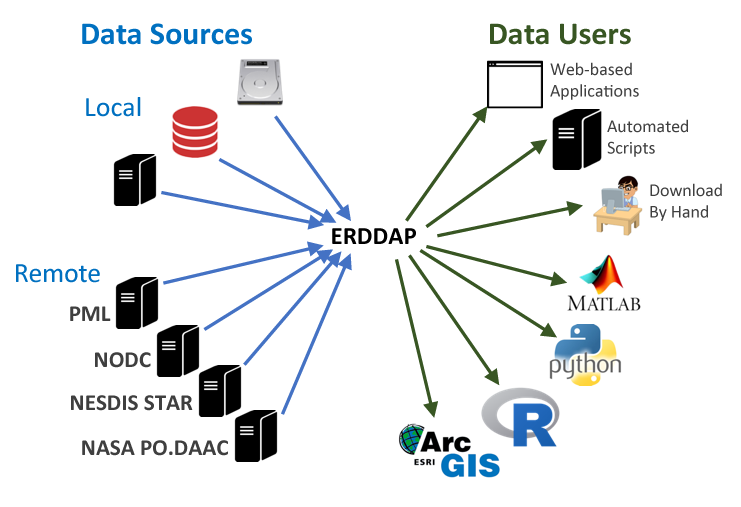
Features of ERDDAP:
- Data in the common file format of your choice. ERDDAP offers all data as .html table, ESRI .asc and .csv, Google Earth .kml, OPeNDAP binary, .mat, .nc, ODV .txt, .csv, .tsv, .json, and .xhtml
- ERDDAP can also return a .png or .pdf image with a customized graph or map
- Standardized dates/times (“seconds since 1970-01-01T00:00:00Z” in UTC)
- A graphical interface for humans with browsers
- RESTful web services for machine-to-machine data exchange and downloading data directly into your software applications (e.g.Matlab, R, Python…) and even into web pages.
Understanding the ERDDAP URL
Download requests to ERDDAP are completely defined within a URL, allowing:
- machine-to-machine data exchange,
- bringing data directly into analysis tools,
- and the use ERDDAP as a back end to drive customized online interfaces.
For example, here is the ERDDAP URLs of the monthly chlorophyll-a from European Space Agency’s OC-CCI product: https://oceanwatch.pifsc.noaa.gov/erddap/griddap/esa-cci-chla-monthly-v6-0.csv?chlor_a[(2023-03-01)][(89.9792):(-89.9792)][(0.02083):(359.9792)]
We can deconstruct the URL into its component parts:
| Name | Value | Description |
|---|---|---|
| ERDDAP base URL | https://oceanwatch.pifsc.noaa.gov/erddap/griddap/ | Web location of ERDDAP server |
| Dataset ID | esa-cci-chla-monthly-v6-0 | Unique dataset ID |
| Download file | .csv | Data file to download (CSV is this case) |
| Query indicator | ? | Mark start of data query |
| Variable | chlor_a | ERDDAP variable to download |
| Time range | [(2023-02-15):1:(2023-03-01)] | Temporal date range to download |
| Latitude range | [(89.9792):(-89.9792)] | Latitude range to download |
| Longitude range | [(0.02083):(359.9792)] | Longitude range to download |
By reading the URL, you get an idea of the data to be accessed, and you can modify the data request by simply modifying the URL.
List of ERDDAP servers
ERDDAP has been installed by over 100 organizations worldwide. A complete list is available here. You can search worldwide servers here.
CoastWatch
* CoastWatch West Coast Node https://coastwatch.pfeg.noaa.gov/erddap/ * CoastWatch PolarWatch Node https://polarwatch.noaa.gov/erddap/index.html * CoastWatch Central Pacific Node https://oceanwatch.pifsc.noaa.gov/erddap/ * CoastWatch Gulf of Mexico Node https://cwcgom.aoml.noaa.gov/erddap/ * CoastWatch Great Lakes Node https://coastwatch.glerl.noaa.gov/erddap/ * CoastWatch Central https://coastwatch.noaa.gov/erddap/
More tutorials on how to use ERDDAP servers